PromptCast: ask every AI at once
I compare AI answers the way everyone does. Same prompt in ChatGPT, then Claude, then Gemini, then two more tabs, then I forget which tab said the useful thing. After the fourth copy paste I started thinking about the plumbing instead of the question. So I built PromptCast, an open source Chrome extension. One prompt box, seven AI chat sites, every answer side by side.
No account, no server, no tracking. Your prompt goes straight from your browser to the AI sites you chose. The extension installs with access to zero websites and asks for one origin at a time, only when you switch that provider on.

What it is
PromptCast is a Manifest V3 extension. The popup composes the prompt. The background worker opens one tab per provider and types into each chat box through a content script. The grid view docks all the answers in a single tab so you can actually compare instead of alt tabbing. There is also a floating overlay, so Ctrl+Shift+X brings the composer up on any page without leaving it.
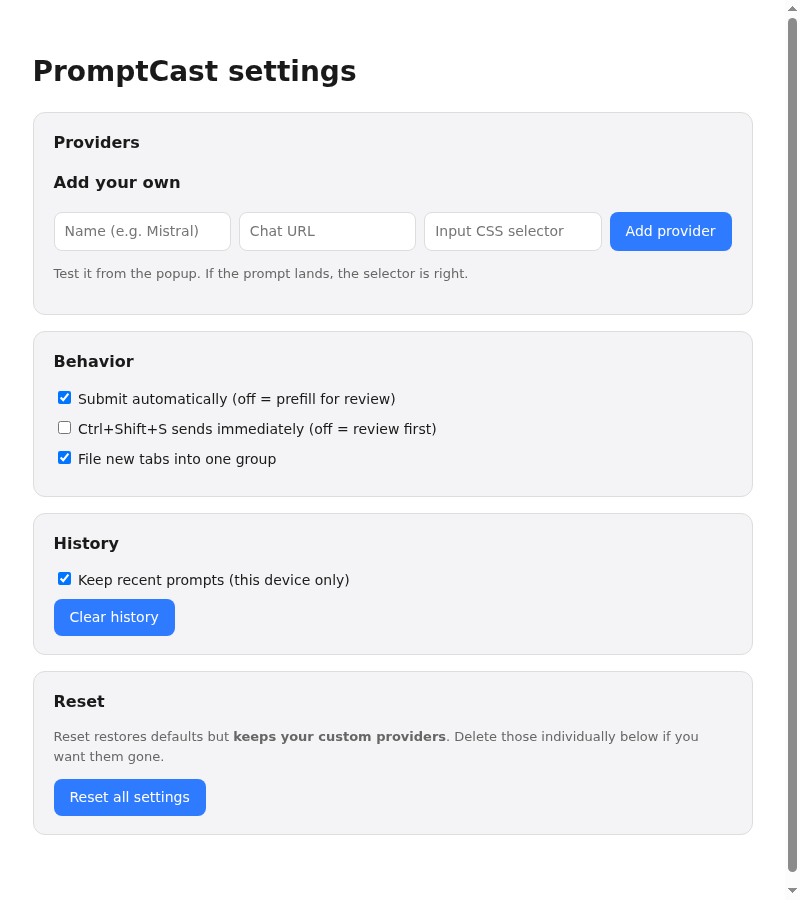
Custom providers are first class. If your team lives in Mistral or Qwen or a self hosted UI, you add a name, a URL, and a CSS selector for the chat input, then test it from the popup. If the prompt lands, the selector is right.

Verified sends
The decision I am proudest of is a small one. Chat editors like ProseMirror and Quill can swallow a synthetic paste and leave the previous draft sitting in the box. If you submit blind after that, you send the wrong prompt and report success. (I watched this happen during testing. It is deeply unpleasant.)
So PromptCast reads the editor back after every fill and requires the prompt to actually be there. A fill the editor swallowed is never followed by Enter. The delivery record says what happened in plain words: sent, ready in the box, needs access, box not found, not sent, timed out. Each failure gets a retry button next to it.
Scoped by default
Two more choices that keep the extension honest. The grid needs AI sites to allow framing, which means stripping their frame blocking headers. PromptCast enables those rules only inside the grid tab, only while a session is live, and switches them off the moment the tab closes. There is no standing header modification sitting around from install.
And Reset All restores defaults but never touches your custom providers. Those hand tuned selectors are the most expensive data on the settings page, so they are never collateral damage. Deleting one is an explicit button next to its own row.
What this means if you hire me
Browser extensions are trust software. They run inside other people's pages, so every permission, every injected script, and every network call is a promise. This project is how I keep those promises: minimal install footprint, per origin consent, verified actions, and failure states a non engineer can read.
The code is MIT licensed. Load it unpacked, add your providers, and tell me which AI wins your comparisons.
Have a project like this in mind?
I help brands and teams turn ideas into finished, living work. If something here sparked an idea, let's talk.